
















This article describes how to install and enable the Acronis Backup plugin for cPanel / WHM.
About Acronis Cloud Backup Plugin
With the use of Acronis plugin for cPanel / WHM, server owners and administrators can now benefit from the following:
- Back up an entire cPanel server to the cloud storage with the disk-level backup
- Recover the entire server including all of the websites
- Perform granular recovery of websites, individual files, mailboxes, mail filters, mail forwarders, accounts, and databases, including the databases created outside of WHM
- Enable self-service recovery for cPanel accounts
The plugin works for both Acronis Backup and Acronis Cyber Cloud products.
Requirements & Pre-requisites
In order to successfully install the Acronis Backup plugin on your cPanel / WHM, you need to ensure your server meets the following (minimum) requirements:
- PHP version 5.6 or later
- Granular recovery of databases is supported only for local MySQL
- Granular recovery of PostgreSQL databases is not supported
- Besides the plugin, a backup agent must be installed on the same machine. If cPanel is running on a Virtuozzo container, the backup agent must be installed on the Virtuozzo host instead of the container
- The list of supported operating systems for the backup agent (Agent for Linux) is available at https://www.acronis.com/en-us/support/documentation/BackupService/index.html#33496.html
- The list of supported virtualization platforms is available at https://www.acronis.com/enus/support/documentation/BackupService/index.html#37870.html
- The agentless backup of VMware vSphere and Microsoft Hyper-V is not supported
Installation Instructions for Acronis Backup on cPanel / WHM
Firstly you need to SSH as root on your cPanel / WHM Server and execute the following commands:
cd /root/sh <(curl -L https://download.acronis.com/ci/cpanel/stable/install_acronis_cpanel.sh || wget -O -
https://download.acronis.com/ci/cpanel/stable/install_acronis_cpanel.sh)The last command will download the plugin from Acronis official source and will execute/run the installation script.
Should you see that the script installation has been completely without any errors, you can type exit to disconnect from the ssh terminal and proceed with enabling the backup agent from WHM panel.
Enabling the Acronis Backup Agent on WHM
To enable the backup agent, you need to:
1. Login to WHM UI (https://server-ip-address:2087)
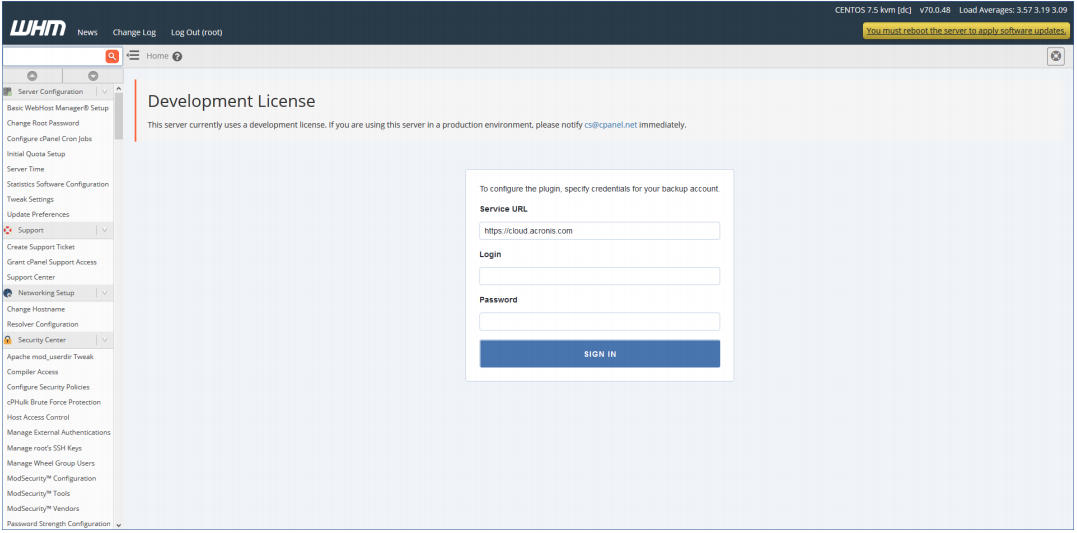
2. From the left-side menu, click Plugins > Acronis Backup
3. Specify the credentials of the account to which this machine/server should be assigned
If you don’t have an Acronis Backup account, please check out our plans or contact us.
How to Uninstall Acronis Backup plugin from cPanel / WHM
In order to uninstall the Acronis Backup plugin from your server, follow these steps:
1. SSH on your cPanel server with a root-level account
2. Execute the command:
yum remove acronis-backup-cpanelNote: Removing the extension will also uninstall the backup agent from the cPanel server. The backup accounts you created and the backed-up data will be left intact.