

















In this tutorial we will explain the easiest way to connect to your Linux server from a Windows 10/11 workstation.
Prerequisites:
- PC or Laptop with Windows.
- Putty software (32-bit Download , 64-bit Download)
- Internet Access
- Active Linux VPS or Linux Dedicated Server
- Your server’s IP address, Username and Password (can be found from within the myNetShop portal)
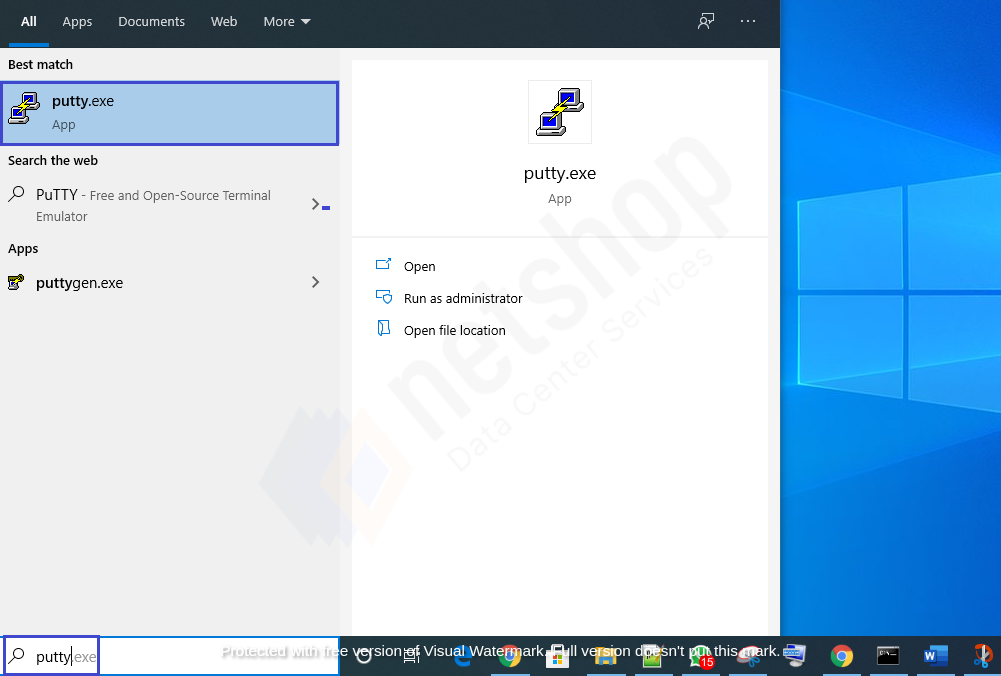
Step 1 – Run Putty
Click on the search bar at the left bottom of your Windows 10/11 screen and type Putty as shown below. Click on the Putty icon to launch the software.
Step 2 – Connect via SSH
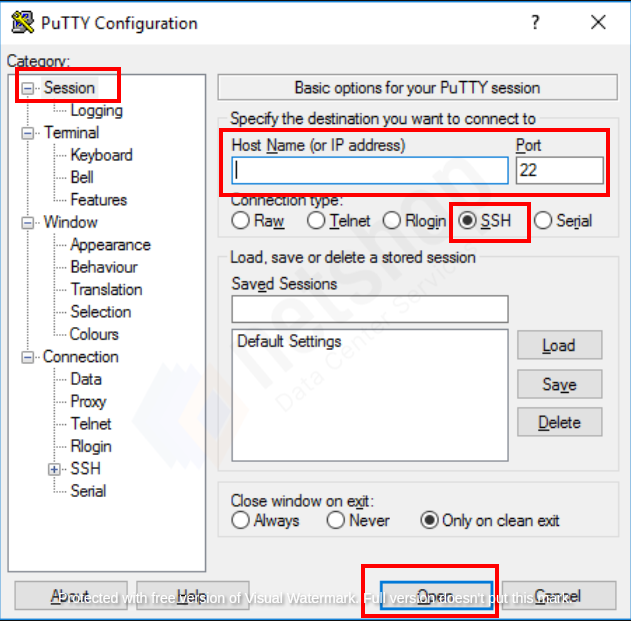
Host Name (or IP Address): Enter your server’s IP Address
Port: 22 (Default)
Connection type: Click SSH
Then click the Open button as shown below.
Congratulations! You are now connected on your Linux server from Windows via PuTTY (SSH).


